

Knowledge Base
Categories
Crossref XML Plugin for OJS
This plugin allows the Open Journal Systems (OJS) platform to create DOIs directly on your Crossref DOI prefix, and to send those metadata records to Crossref automatically from within OJS.
When to use it: Use this method if your journal runs on the OJS platform (version 3.3 or 3.4). Because OJS is a journal platform, the plugin only supports journals and articles — not books, conference proceedings, dissertations, reports, datasets, or other content types.
Basic workflow:
- Cited-by (OJS Scopus/Crossref plugin) - as of OJS 3.2, this third-party plugin allows journals to display citations and citation counts (using article DOIs) from Scopus and/or Crossref. If the plugin is compatible with your version of OJS, you can install this plugin via the plugin gallery.
- Enable the plugin in the Installed Plugins tab (Website > Plugins > Installed Plugins)
- Choose which Providers (Crossref, Scopus, or both) you’ll use for the plugin using the dropdown menu
- Enter the API Key for Scopus and API username and password for CrossrefConfigure the information you want to display on your article landing page along
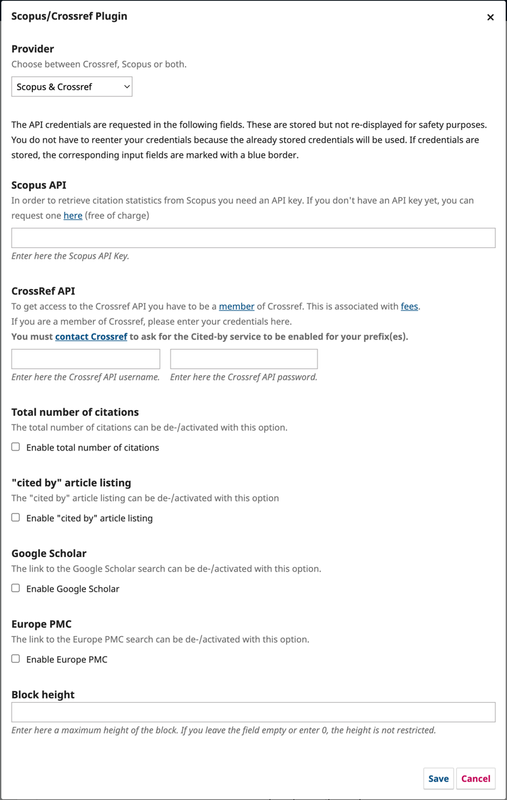 Image Source: https://docs.pkp.sfu.ca/crossref-ojs-manual/en/citationsplugin
Once enabled and configured, the plugin will display the count and list of the citation on the sidebar of the article landing page. Image Source: https://docs.pkp.sfu.ca/crossref-ojs-manual/en/citationsplugin
2. Funding Metadata plugin - as of OJS 3.1.2, it is possible to enable a funder registry plugin for submitting funding information to Crossref. The plugin will use the Open Funder Registry to check against existing funding agencies. The plugin will include funding information in your Crossref DOI deposits. Installing and Enabling the Plugin:
- Navigate to the user dashboard
- Click settings
- Click plugins
- Click the submenu item plugin gallery
- Find the plugin labelled “Funding” and click the titleInstall the plugin by clicking “install”
- Once you get a notification that the plugin is installed, click the submenu item plugins
- Locate the Funding Plugin and click the blue checkbox on the right to enable it
3. Similarity Check plugin - if you are using OJS 3.1.2 or above, you are able to use the Similarity Check plugin. This will enable you to automatically send manuscripts to your iThenticate account to check their similarity to already published content. You will need to be subscribed to Crossref’s Similarity Check service for this to work.
4. ROR plugin - the ROR Plugin for OJS enables authors to add the ROR ID for the organization they are affiliated with (https://doi.pubmedia.co.id/knowledge-bases/24).
Related Articles
PT Pubmedia Digital Sains
Jl. Sidorejo, Gg. Nakula No. C12 Ngestiharjo, Kasihan, Bantul, D.I Yogyakarta 55182 [email protected] +62 851-6865-2024Partners