

Knowledge Base
Find guides, tutorials, and answers to questions about our services.
Categories
Enabling References Settings
Published on
09 Jul 2026
275 views
This setting makes sure the References field appears in the manuscript metadata, so reference data can be collected and sent to Crossref.
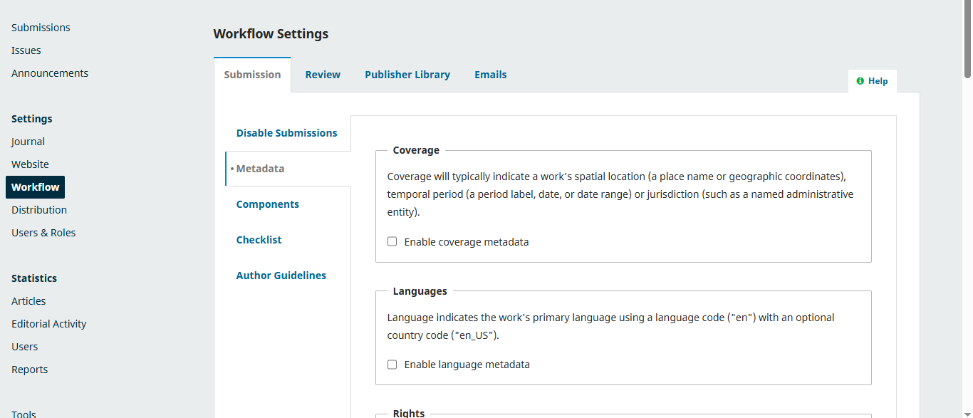
Step 1 Log in to your OJS admin account, then open the Workflow menu. On the Workflow Settings page, select the Submission tab and go to the Metadata section.
Step 2 Scroll down to the References section, then check Enable references metadata. It is recommended to choose the option "Require the author to provide references before accepting their submission" so filling in references becomes mandatory when the author submits a manuscript.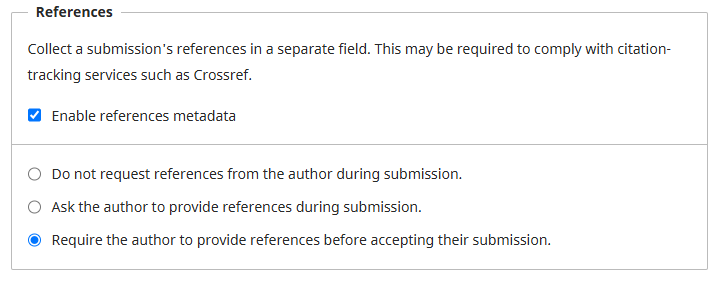
Once the option is saved, the reference setting configuration is complete.
Related Articles
PT Pubmedia Digital Sains
Jl. Sidorejo, Gg. Nakula No. C12 Ngestiharjo, Kasihan, Bantul, D.I Yogyakarta 55182 [email protected] +62 851-6865-2024Partners


© 2026
PT Pubmedia Digital Sains
. All rights reserved.