

Knowledge Base
Find guides, tutorials, and answers to questions about our services.
Categories
OJS 3.2 Tutorial
Published on
11 Jul 2026
240 views
- Manual deposits are always available from OJS 3.2 onward. In addition to automatic deposits, journal managers can still perform manual metadata deposits at any time.To enable automatic deposits, simply check the box on the settings page.
 Image Source: https://docs.pkp.sfu.ca/crossref-ojs-manual/en/config
 - Checking DOI deposit status: open the Crossref plugin settings page and click the Articles tab at the top. A status column on the right of the article list shows whether a DOI has been successfully registered.
- Performing a manual deposit: on the Articles tab, check the box next to the articles you want to register (use the search feature in the upper-right corner to filter by issue), then scroll down and click the Deposit button.
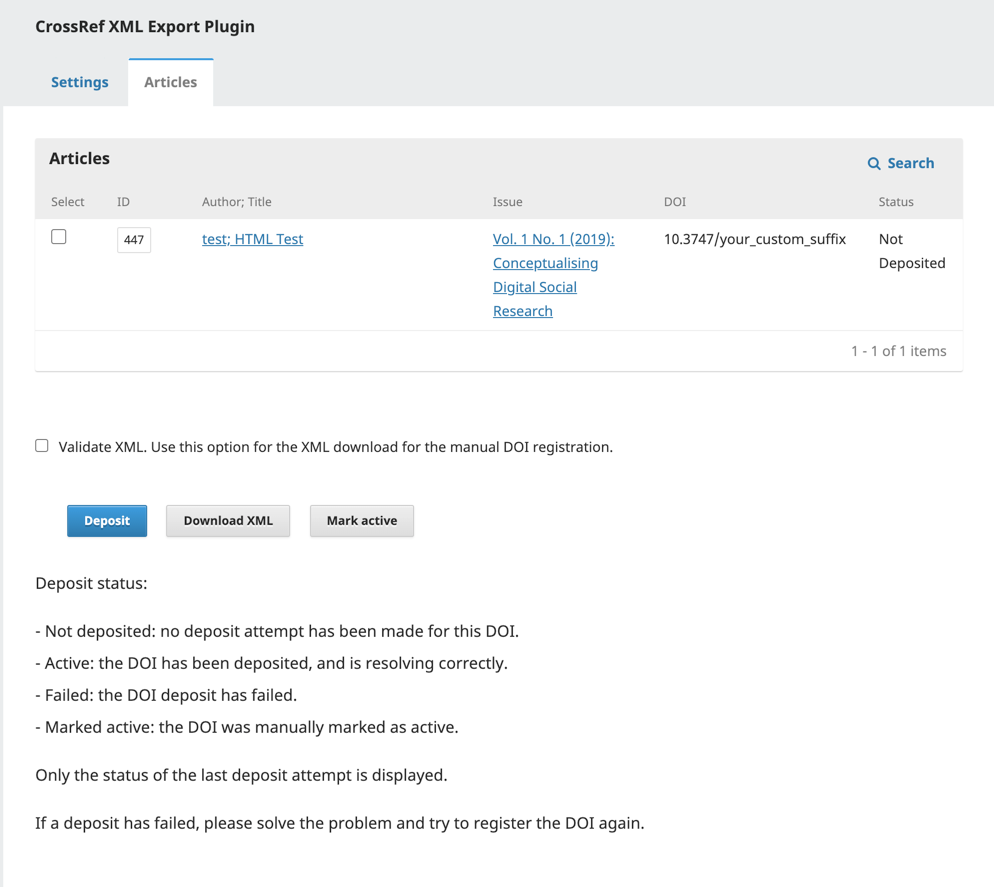 Image Source:: https://docs.pkp.sfu.ca/crossref-ojs-manual/en/config
 - Exporting XML manually: check the desired articles, then click Export. The resulting XML file can be uploaded manually via the Crossref admin portal at https://doi.crossref.org.
- Metadata updates are not automatic. If you edit the metadata of an article whose DOI is already registered, you need to manually re-deposit it via the Articles tab so Crossref's record is updated as well.
- Note that OJS sends deposits at specific timed intervals rather than instantly, so the DOI registration status may only appear some time after the deposit process runs.
Important Notes
- A "401 unauthorized status code" error indicates a mismatch between the entered username/password and the credentials registered with Crossref. Double-check the username format, especially for personal credentials (must be email + role, not email alone).
- Make sure the DOI prefix is entered correctly, always starting with 10. followed by the numeric sequence assigned to your journal by Crossref.
- Enable the References plugin whenever possible — linking references is a Crossref membership requirement, not merely an optional feature.
- Allow time for deposit status verification. OJS sends deposits at set intervals, so a "successful" status may not appear immediately; wait up to a day before assuming a deposit has failed.
- Article metadata updates are not automatically sent to Crossref. Whenever metadata for an article with an existing DOI is updated, perform a manual re-deposit.
Related Articles
PT Pubmedia Digital Sains
Jl. Sidorejo, Gg. Nakula No. C12 Ngestiharjo, Kasihan, Bantul, D.I Yogyakarta 55182 [email protected] +62 851-6865-2024Partners


© 2026
PT Pubmedia Digital Sains
. All rights reserved.