

Knowledge Base
Find guides, tutorials, and answers to questions about our services.
Categories
Requiring Authors to Fill in an ORCID iD
Published on
10 Jul 2026
368 views
ORCID (Open Researcher and Contributor ID) is a unique identifier for researchers, used to link an author's profile to their scholarly publications. This section explains how admins add or update an author's ORCID iD through the OJS admin panel.
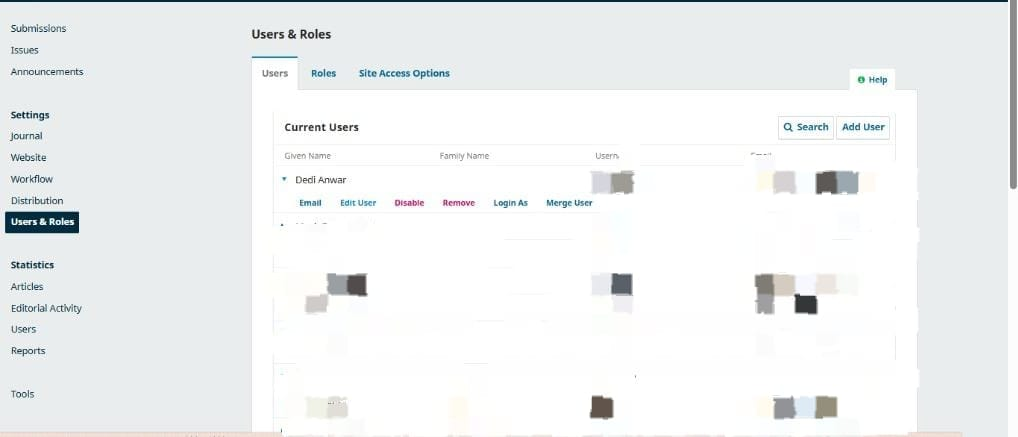
Step 1 Log in to your OJS admin account, then open the Users & Roles menu. On the Current Users tab, find the relevant author's name, then click Edit User.
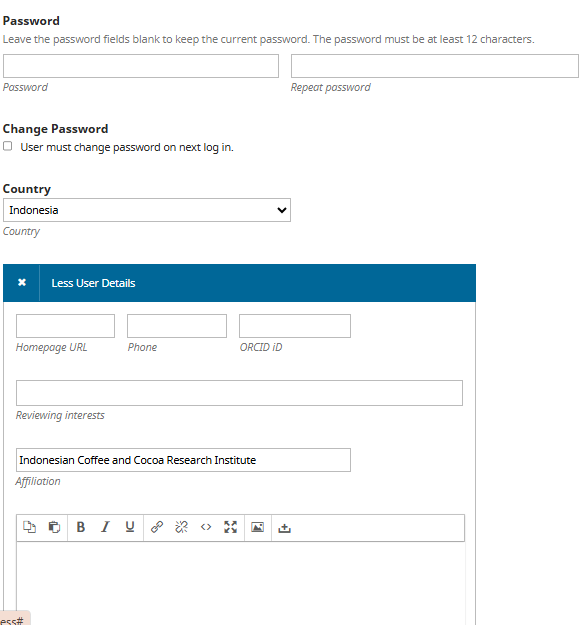
Step 2 On the Edit User page, scroll down to the Less User Details section (or More User Details), then fill in the ORCID iD field with the author's ORCID iD (example: https://orcid.org/0000-0002-1825-0097).
Step 3 Save the changes once all fields are filled in correctly.
Related Articles
PT Pubmedia Digital Sains
Jl. Sidorejo, Gg. Nakula No. C12 Ngestiharjo, Kasihan, Bantul, D.I Yogyakarta 55182 [email protected] +62 851-6865-2024Partners


© 2026
PT Pubmedia Digital Sains
. All rights reserved.